Firefox 3.0RC1

I updated the Firefox to 3.0rc1 (release candidate) moments ago. There was four extensions I'm using that are not compatible with this version. Fortunately I've got them fixed by manually modifying the maxversions in install.rdf. The method is in below:

Step1: Find the addons file (*.xpi) and download it to your PC.
Step2: Unzip the xpi file.
Step3: Edit install.rdf and change the maxversion to 3.0.
Step4: Zip all files into *.zip and change it to *.xpi.
Step5: Install the new *.xpi by open file... in Firefox menu.

gmarks-0.9.9-fx
URL: https://mail.google.com/mail/?ui=2&ik=bcbfa2d058&attid=0.1&disp=emb&view=att&th=119f49a96c91b940

firegestures-1.1-fx
URL: https://mail.google.com/mail/?ui=2&ik=bcbfa2d058&attid=0.2&disp=emb&view=att&th=119f49a96c91b940

gladder-2.0.2.1-fx
URL: https://mail.google.com/mail/?ui=2&ik=bcbfa2d058&attid=0.3&disp=emb&view=att&th=119f49a96c91b940

simplemail.2.66
URL: https://mail.google.com/mail/?ui=2&ik=bcbfa2d058&attid=0.4&disp=emb&view=att&th=119f49a96c91b940

又一个很好的扩展 - Simple Mail

Simple Mail 这一款 Firefox 的邮件客户端扩展正如它的名字描述的那样:非常的简单。简单的 Account Setup 界面,简单的 Preference 选项,除此之外就真的没有什么了。这对于应付一般的邮件收发已经足够了,现在开始试用一段时间,没什么问题以后这就是我的 Mail Client 了。

DictCN

I find a wonderful add-on for Firefox right now, DictCN, which is an online English to Chinese (and vise versa) dictionary extension for FF developed by Google Code. With the DictCN I think Kingsoft's CIBA can be rarely started in your computer.

To use DictCN, simply hover the mouse (coming with 3.0) upon the word you want to translate , or select it (drag or double-click to highlight the word), the translation (pronunciation and explanation) will show up soon in a layer on the same web page.

You may click on the 'D' icon on the status-bar to activate and deactivate DictCN (color of the icon changes correspondingly). You may also press ctrl-alt-d short-key to do the job.

By Moving the mouse over the translation, you can hear the speech, and a click on it will bring you to the detailed explanation page.

Upgrade To Firefox 2.0

This morning when I turned on the computer I found Mozilla Firefox release 2.0 was announced available today, and then downloaded it and had a try at once. It's more faster both at startup and browsing web pages. It should take some time to figure out its stability.

For my installed extensions (Firefox calls them add-ons in 2.0), three of them are incompatible with the new version: Fasterfox, MinimizeToTray and Tab Mix Plus. Either wait for their upgrading or find other ways to use them. I let Fasterfox disabled and wait its upgrading because it has less impact to me. MinimizeToTray can be easily installed as long as you manually modify the install.rdf (maxVersion to 2.0 or higher) within the installing package. It seems that Tab Mix Plus cannot fit FF2.0 as easily as MinimizeToTray does. So I choose another tabbed browsing add-on, Tab Mix Lite, which works fine to me.

Switch or upgrade your browse to Firefox 2.0. It's really better than Internet Explorer.
Firefox 2

My Firefox Add-ons

I've been using Firefox as my web browser for nearly 2 years. Yes it's safer, faster, and better as it describes. Due to its tabbed browsing you don't have to open dozens of windows any more. Besides I feel FF is more clean and more stable than IE, and of course it's very interesting for a lot of add-ons supporting. Almost you can find any gadget you want by installing a small extension. Here lists my FF add-ons and their short descriptions. Trust me! They are quite interesting and helpful when you are surfing.

1. Adblock Plus, prevents advertisements and banner from displaying.
2. Fasterfox, speeds up browsing webpages.
3. FlashGot, enables single and massive downloads using the most popular external download manager.
4. FoxyTunes, controls any media player in FF.
5. Gmail Manager, Gmail accounts management and new mail notifications.
6. Gmail Space, uses your Gmail account space for file storage (upload/download).
7. GMarks, shows your Google Bookmarks in the sidebar.
8. Google Notebook, allows notetaking while browsing.
9. IE Tab, enables you to use the embedded IE engine within FF.
10. MinimizeToTray, minimizes FF window into the system tray.
11. Performancing, a full featured blog editor that sits right in your FF browser and lets you post your blog easily.
12. Tab Mix Plus, a big enhancement for tabbed browsing.


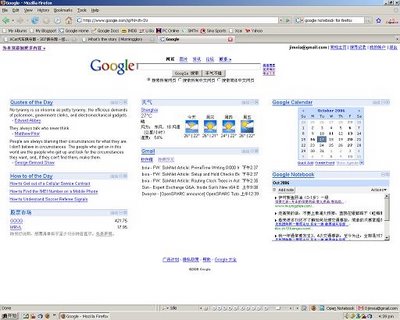
My Firefox window snapshot

PFF, Performancing Firefox

This post is editted and published from my new Firefox add-on Performancing. It looks interesting for blogging!

PFF, Performancing Firefox is a plug-in (extension or add-on) for Firefox, which is compatible for most of blog services. At least it works fine for Blogsome (or Wordpress alike) and Blogger. Within Firefox browser you can publish a new post or edit a existing post by only clicking F8 or pushing a status icon.